This is super cool, and I wish something like this existed at my place, as it enables information sharing without the need for phones/actual screens that shine in your face when the lights are low or tempt you to doomscroll.
That said, the large primary display this uses is $2000. That's very hard to justify for any "normal" household, and that's without any mounts, backend, services etc.
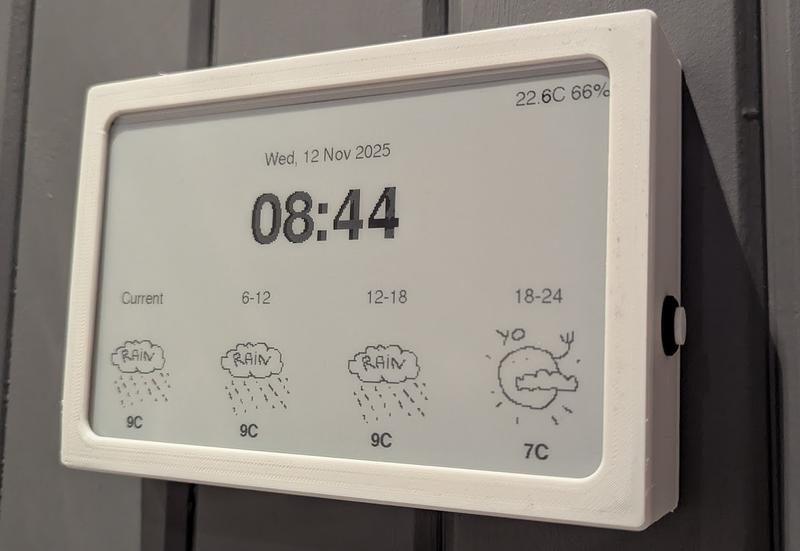
I made this thing [1] for us, it uses a cheap 10" e-paper display off aliexpress, an ESP32 and a couple of I2C sensors. The case is 3D-printed. It runs on two 18650 batteries, and all in all it cost less than 100$. The OpenWeather API is free for personal use.
Thanks! I intentionaly made the weather symbols somewhat "childlike" to give it some personality and also make it obvious that it's a custom device, and not some off the shelf gadget. Works well as a conversation starter!
I incorporated OpenMeteo into a project recently and got frustrated with their aggressive rate limiting. If in the US, weather dot gov has an excellent, free API. Or, OpenWeatherAPI which works internationally and has support for more things that weather dot gov does not. OpenWeatherAPI will also synthetically provide weather data based on their models if there is missing station data
The sun is greeting you! I drew these freehand, kind of quickly. And while I personally like the style and think it's a good fit for us, I did intend to make several sets of weather icons. At the very least I need to make the sun symbols adapt to the seasons - we don't really have a full sun during the darkest months of the year where I live.
Yes, I think so. Electronics prototyping is so accessible now, and there's such a deluge of inspirational projects out there to learn from. YouTube is a gold mine, and I'll leave links to a few channels I follow, below.
If you get an Arduino or Esp32 microcontroller (maybe in one of those starter-kits with various sensors), some breadboards, assorted jumper-cables and a kit with electronic components (resistors, caps) you'll be good to go. A device like a wall clock most likely won't require soldering, since it won't be jostled or moved around much.
If you already have Home Assistant running, I think it should be simple. Most of the time you can buy devices with pins already soldered and it's just the matter of connecting them together. AIs are pretty good with ESPHome configs. You can even take a picture so that they can help you identify the correct pins. Some coding may be required for drawing things on the display though.
I source most of my components from aliexpress. It's been a while, but these are the components I used:
Microcontroller: FireBeetle 2 ESP32
Display: Generic 10" e-Paper display with driver board included
Timekeeping: DS3231 Real Time Clock Module
Temperature and humidity: BME280 module
Charging: Type-C USB 2S Li-ion BMS
That, along with a breadboard, two 18650 batteries, some resistors and capacitors make up the hardware. I modelled and 3D printed the case. I used the PlatformIO plugin (available for VSCode-based IDEs) for programming and transferring code to the esp32.
+1, and have you tried running 2 displays side by side ? That should give you an effective diagonal of 14 inches or so, and for those displays, cutting it in two does not really affect the utility of the display (likely tabular content anyway).
Seems like the author has experimented with 2 kindles side by side.
You might be interested in knowing about https://trmnl.com. No affiliation beyond interest in buying a few in the future. They have a 10.3" version in the works.
My solution was to buy a used Samsung tablet with OLED screen, and control the display on with motion sensors. It sits in the hallway, above the keys drawer. The screen is on only when someone's walking nearby, and around eye level when you go pick up the keys. Designed the dashboard based around muted colours on black background, with brights reserved for "hey pay attention to this" data. And most importantly, the screen is not visible from any spot you're likely to stay at for a longer time. As for mounting, I used calipers, 3d printer and some double sided tape. It's not completely seamless, but damn close for ~10% of the effort.
You can make smaller ones for much much less. I’ll post pics of mine a bit later but waveshare 7.5” display in a photo frame and almost any ESP32 dev board and you are set for less than $100 (along with suitable HomeAssistant and ESPhome infrastructure to support it).
The original article is a very slick bit of work, so well done
The article also mentions using jailbroken kindles which I assume should be the cheapest way to get a decent sized epaper screen with builtin connectivity.
Gonna piggyback here to second this and chime in to say I went with the BYOD screen linked within your link for $49 (SKU 104991005). It's definitely more barebones and probably not even as cost-effective if you're still planning on buying the "lifetime" TRMNL API access.
I don't have easy access to a 3d printer, so I just have mine sitting on an extra phone stand I had lying around that can be had for a few bucks from Amazon.
I couldn't be happier with it and am thoroughly enjoying my complacent, lazy solution :)
i could have been clearer about that. but yeah, even for what i paid, i was happy to immediately be off to the races designing the couple panels within their web portal and having something functional and useful to me without any real friction from having to figure things out.
moving on to the self-hosting side is probably now backburnered indefinitely, even if i do have some grander ideas in the longer term. unfortunately, i'd need more than a weekend project's timeframe to bring them to fruition.
OP's Timeframe looks rad, but yes on the pricy side. check out trmnl .com for smaller / less expensive options and self hosted options. (disclaimer: i'm on the team)
thanks for the support and i hear you. a few folks pointed their Boox at TRMNL[1], and we’re finally in the smart home arena now with free 5 min refresh rate for Home Assistant. aiming for JIT refresh by summer.
bought trmnl & have been sorely disappointed with the transparency regarding self-hosted options & the availability of functionality. Was led to believe Hanami BYOS was identical to the hosted server. have opened a ticket, have had others voice the same sentiment. I appreciate the effort, but lament the reality of TRMNL & the marketing.
you can import ~700 plugins from core to Terminus (Hanami build) or the Laravel build in 1 click. maybe you came on board before that was a reality. we and the community have been rapidly developing multiple self hosted servers with all kinds of features and in different frameworks for comfort. in no marketing materials have we ever claimed that OSS clients were the same as the main web app. in fact that’s why we offer a BYOD license for the web app only. we’ve invested hundreds of thousands into open source so that people can get the TRMNL experience without paying us a penny.
what do you think it should be called? for ~$15 optional one time bucks people get 24/7 access to the entire engineering team, me, prioritized feature dev, and can earn monthly payouts from our Creator Fund. we don’t charge a subscription, obviously i’m partial but this model has serves us well. and most of the developer edition fee goes right back to the community via bounties, perks, etc.
Developer Access or something like that, and put part of your comment in there. I would remove the word Unlock entirely, it implies you’re locking code, as opposed to providing a service.
I did a similar thing with a regular backlit computer screen.
It automatically shuts off after 30 seconds of inactivity.
I added a $3 webcam, and use openCV to detect motion. If three consecutive frames (sampled 0.5s apart) are each sufficiently difficult from the previous one, it attaches a virtual USB mouse, then moves it one pixel.
This wakes up the display whenever you walk past, then puts it back to sleep again when you stop moving.
The motion-detection pipeline uses less than 0.3% CPU on an intel N100 (6w TDP).
There are lots of other eInk devices you can use LVGL with.
ReTerminal and other derivatives from Seeed Studio are two options. Seeed even has a newish color unitfor under $250 [0].
Not trying to diminish all of the thought and work that's gone into OPs project but a lot of this has been available to do in HomeAssistant for quite some time. Glad more people are finally seeing the value in eInk like this. I've been using them for a while in my office and bedroom for simple status as the OP states: only showing certain status depending on state.
The other unit I tinkered with quite a bit of is the Heltec Vision Master E290 [1] which is a 3" eInk devices for under $35. Based on ESP32 and has LoRa.
There are a couple of options for a large, non-backlit, low power display that are less expensive than the e-ink monitor they're using. One is the Samsung EM32DX, a 32" color e-ink digital sign for <$1300 (<$1000 if you can find it on sale) but it has a long refresh time. The other is the SVD rE 32" reflective LCD monitor for ~$1000, but it needs to be in brightly lit rooms because of its low contrast.
In my post, I talk about how QHD was not high enough resolution for usable text rendering at 32". The SVD monitor is even lower resolution, just 1080p. I'd love to see a true 4k SVD product but I'm guessing it'd be even more expensive than the Mira Pro.
e-ink is low-power and easy on the eyes. But for a cheaper project recipe:
    * repurposed old LCD rotated to portrait mode
    * Raspberry Pi 400
    * Debian with Sway showing various tiled terminals/browser windows
    * self-hosted REST server that collects/provides data to display
If you go the image-rendering route for e-paper, Sharp (the Node.js libvips binding) is surprisingly good for this. You can do grayscale conversion, resize to the exact panel resolution, and apply Floyd-Steinberg dithering all in one pipeline with minimal memory overhead.
The trick with e-ink displays is that naive grayscale conversion looks terrible because you lose all mid-tone detail. Dithering the image down to 2-4 levels before sending it to the display makes a huge difference in readability, especially for things like weather icons and charts. ImageMagick can do it too but Sharp is about 4-5x faster for batch processing since it avoids spawning subprocesses.
I have a similar setup at home with a homemade dashboard. It's less polished and I've never implemented smart home (don't use any smart home devices) but it's calendar, weather, air quality and subway alerts. I also took the tack of building the UI with Bootstrap 3 so that it will run on any of my ancient devices like a gen 2 ipad air. I did it as much to usefully recycle old screens as anything else.
I solved a problem (not really the same problem as this, mind you) for my family
using a much older technology. I bought a big pane of glass from the hardware store,
built a wooden frame for it with a shelf for an eraser and dry markers.
I hung it up in the kitchen and now when we need to leave "sticky" notes to each
other we just write on it. We keep our shopping list on it, we write small poems
and draw funny faces. It has become a fun ephemeral space for communicating.
Cool idea! At some point I was musing about making or buying a dashboard tool like in the post, but over the years I found that I dont actually need the complexity that comes with it.
An analogue communication medium for myself and others is indeed something that might be much more impactful and human-cetric than a smart system.
This is awesome but I still find it funny that he said he wants a healthy relationship with technology then goes and fits his entire house out with technology. It doesnt seem like any of this would really be useful as you'd have to enter all the useful data manually(calendar).
For example the washing machine. You dont need real time information because you know how long it takes since you've done it 1000s of times and it beeps. All these things are just managed in our heads subconsciously.
> For example the washing machine. You dont need real time information because you know how long it takes since you've done it 1000s of times and it beeps.
It beeps, on the other end of the house (or on another floor), where it's inaudible. (And, thankfully, where the loud sounds of it operating are also inaudible.)
> All these things are just managed in our heads subconsciously.
And when you remove the need to track that in your head, your head gets freed up for other things.
To be explicit, I don't like "smart appliances" that connect to a cloud server. I do like the idea of devices that can connect locally to something like Home Assistant.
I'll just add this tip for those who struggle with this sort of thing.
I leave the empty basket in front of the machine, which for me happens to be somewhere where I'll pass by frequently until I need to take it out. That keeps it 'in sight, in mind'. Heck you could even put it in the kitchen to remind you.
I don't like the extra complexity that often comes with digital solutions, but I do like having a system. The simpler and less thought required, the better.
I do this for a number of different things. Rather than put it on a list I put it somewhere where it's in the way.
But this then means I have to have something on the floor in the way, which I also have to remember to do, and it doesn’t tell me anything about how long is left.
That requires more thought and clutter than just having the information when it’s relevant.
My pro tip is one of my girlfriends scrunchies stolen and put on my wrist - annoys me intermittently and therefore repeatedly reminds me to check the laundry.
You know, sometimes it doesn’t and sometimes it does. And also I’ve been known to forget it overnight and wake up to moldy clothes.
I have a friend who will say things like “I have to go at 3” and get up at 3 on the dot without even looking at her watch/phone. I’m not that guy and I need buzzers, timers, and ambient displays all working together anything done at a time.
OT but if your washing gets mouldy after being left in the washing machine overnight, you need to clean your washing machine (and/or use more detergent).
A bit OT but you may want a side loader. It's obviously not ideal to leave it overnight but the few times that's happened to me there isn't any mold. I'm guessing you have a top loader, it may not have been cleaned in a long time, and that it's in a basement that's prone to mold also.
For me it's not the washing machine, it's the dryer. The time remaining reported by the dryer when you start the cycle has almost no relation to how long it will actually take. Sometimes I go down to the basement after an hour (the dryer says 45m when you start it), and it still says 30m remaining. It's not the end of the world of course, but it is annoying, and it's the sort of annoyance technology can solve pretty easily.
On all settings except timer, my dryer is pretty much useless. I set it to dry my bedsheets and towels with bulky item preset, max dry (who chooses minimum dry for anything?) and it'll say it'll take 1h30m, ends up taking 30 minutes, and everything is still wet, despite it having a "dryness sensor"
I've just started using the timer function on the dryer and it's been mostly accurate, plus or minus a few minutes perhaps.
And the timer goes off when you are in the shower - by the time you are done you forgot about the alarm. (I have more than once stopped an alarm I intended to just snooze)
Your comment reminds me of those infomercials where they try really hard to make something as simple as cooking spaghetti look like an unimaginable nightmare that no one could possibly accomplish
You have to imagine other people might think differently than you do...
I forget, it happens, nothing I can do with it. Having notification on my phone (place I'll look sooner or later) that laundry is done was great lifehack for me. No longer I forget and leave it there for whole night or even days...
Disclaimer: I use Home Assistant too and I'm guilty of all these things.
Home Automation is just a hobby like "productivity" tools or going all in your coffee setup. You tell yourself you are saving energy, or freeing up your mind from remembering mundane tasks but in reality it's just like a model train set.
It's fun to set up, play around and maintain it for some people. If you'd do the math of setting up hundreds of dollars worth of smart appliances, bulbs, hubs and thermostats to tweak your heaters slightly while you are not at home...it will probably take decades to break even, if at all.
Using technology doesn't necessarily mean an unhealthy relationship with technology. I think it differs for everyone.
For me, I think a healthy relationship with technology is technology that is there when I need it, not there when I don't. Added benefit if the technology knows when it's needed (ie alarms and such).
Crucially, a healthy relationship with technology for me is consuming less (reading less "news" and blogs and social media) and creating more (writing, projects, etc). So the concept of using technology to build something that is there when the family needs it and is in the background when not is a healthy relationship imo.
> For example the washing machine. You dont need real time information because you know how long it takes since you've done it 1000s of times and it beeps
I'm not sure this is true anymore, first you usually do different programs depending on what you put into it, and modern washing machines also automatically adjust the washing time depending on how much you throw into it, at least our ~2 year old one does, I'm sure others do too.
I basically never know how long time it will take, sometimes it takes 1.5 hours and sometimes 3 hours. Our washing machine is further away from where we can hear the melody, so having a notification appear on the phone when it's done is actually quite handy, at least for our situation.
On all settings except timer, my dryer is pretty much useless. I set it to dry my bedsheets and towels with bulky item preset, max dry (who chooses minimum dry for anything?) and it'll say it'll take 1h30m, ends up taking 30 minutes, and everything is still wet, despite it having a "dryness sensor"
I've just started using the timer function on the dryer and it's been mostly accurate, plus or minus a few minutes perhaps.
Fortunately, we usually just throw clothes in the dryer before bed, so we don't need a system to remind us when it's done — if it's not done by morning time then we probably need a new dryer!
I can't image being so busy that hanging the clothes for 10 minutes could be seen as not important. We all live different lives :)
Besides, the notification is for notifying us, doesn't mean we need to do it within N minutes, it can wait until your Very Important Business Call is over or whatever. As long as it's done before it starts to get overly humid and starts to smell.
Eh, ok, that's not how I treat them, and if you want to remain sane, you might want to give it a try to treat them differently too, because that sounds highly annoying and borderline frustrating.
> All these things are just managed in our heads subconsciously.
That’s certainly true for some people, and I envy them. Others of us can easily forget the washing machine was on and needs emptying for anything up to three or four days, running it each day before promptly forgetting to empty it before it needs doing again.
It depends if that works for you or not. For some if that alarm goes off while they're in the middle of something they'll either snooze it (now you're getting disturbed more times) or turn it off, perhaps both. This seems quite a bit more intrusive than what is essentially a little todo list that's updated without having to remember to do it.
This also just adds a series of manual steps, along with having tech setup to deliberately get your attention at a time that may not work for you. I'm not sure why this is seen as a nicer solution than having it happen automatically for you.
Peoples brains work in different ways, and they have different lives. Some days I can more calmly go around dealing with things, others I have a very large number of parallel things to do with more interruptions happening as well (two young kids will do that).
It's a pattern among tech folks to try to solve things with technology.
It is hard to stop yourself from treating every minor inconvenience as nail for which you have a handy hammer, and I find myself overcomplicating things in my life as a result.
The goals are noble but the methods bring a lot of the complexity simply repackaged (and potentially amplified).
For you, maybe, but outsourcing ambient awareness of my environment is what’s finally enabled me to take that leap to a 10x dev. Well, that, and cranial cooling fins.
A healthy relationship with technology isn't the same as not using technology.
> It doesnt seem like any of this would really be useful as you'd have to enter all the useful data manually(calendar).
You have to enter calendar data somewhere, right now I often have the same info or different subset split between my calendar, work ones, my wifes one and the one on the wall. Even the paper version requires having entered the data - more so than the tech based ones because an invitation sent by email now needs to be manually copied over. Or have I misunderstood?
> You dont need real time information because you know how long it takes since you've done it 1000s of times and it beeps. All these things are just managed in our heads subconsciously.
This seems odd to me. First just a couple of things
> You dont need real time information because you know how long it takes
1. It takes different amounts of time depending on the load and settings
2. Knowing how long it takes and when to take it out is something the person who put it on knows, but there are different people in this house who can all do either task
3. It's in a place where the beeping is often not heard
But more interestingly is that we're comparing two different approaches. One is
* A note written in a place that washing needs to be taken out if it's not been done.
You describe this as an unhealthy relationship with technology.
Your better solution is
* Work out when a machine will finish its task, remember this
* Wait for the machine to shout at you
* If you don't hear it shouting then keep checking the time to see if it's finished its task
* Make sure you track all of this in your head on top of anything else
This is more healthy? Than a note on the wall that says "change the washing"?
Imagine you started with the typical thing being that you have a note on the wall that says "washing is done" when it's done and the machine itself is silent. I come along and tell you I've got a much better, healthier way of interacting with it - wait for it to make an annoying noise!
That's the ethos of the entire tiny home movement. Large houses consume a lot of time and mental energy just to maintain them and to walk from one side to the other. I noticed it a lot moving from a 3 story 2,500 sq ft home in Seattle to a similarly sized apartment in Berlin that's all on one floor. My kids do miss sliding down the stairs though.
You can set an alarm on your phone when it starts like millions of people do instead of spending $2000 overengineering a solution to this "problem".
The fact that people are complaining about the cognitive load and beeping sound when running a washing machine is utterly baffling to me. This goes beyond sheltered "first-world problems". There is something insidious about this about micro-optimising for non-issues, something dystopian.
Not all washing machines have static wash times, some (like ours) adjust the time based on what you actually put into it. Not to mention there are like 5-6 different programs we use, who has time to remember kind of how long time each program takes? And it doesn't display how long it'll take until it measured the load, which takes 2-3 minutes.
So instead; chuck in the clothes and cleaning product, put the program, go do other stuff and await for Home Assistant to tell us when it's done. Over-engineered? Nah, just comfortable modern living.
But why? Why add a manual, less accurate step instead of just using HA and solving it once? Steaming takes 20 minutes, a quick wash is ~1h, a boil wash more like 4h.
Why do I want only my phone to have a notification? Why do I want it to override other settings and go off at a set time rather than when I choose to interact (as a notification would)?
You can absolutely solve this in other ways, but adding an automation into HA for notifying me about forgetting to setup the dishwasher took a few minutes max and I only had to do it once.
I'm not arguing to spend lots of money, I'm saying that this is not an unhealthy tech setup. It's quite clear from this writeup that they either enjoy it or were thinking about selling it, or both, and money does not seem to be a particular concern for them. They even explicitly say it's too much for typical consumers, so they're not trying to sell you on the idea of spending this.
> You can set an alarm on your phone
I don't see "manually setup another bit of technology make an annoying noise" as a nicer or more healthy integration of technology in my life compared to a note written on the wall.
> The fact that people are complaining about the cognitive load and beeping sound when running a washing machine is utterly baffling to me
Perhaps you're reading it in some tone that suggests these are huge issues for people to deal with. I am reading them as just niceties in life. I have tried for some time to practice responding to being baffled with assuming I've not understood something, I think you might be baffled here because you have misinterpreted what people have been saying or not understood their personal issues or how easy it can be to setup some of these things.
Same as the timer on my oven is useful, but I don't need one - I could do it entirely manually right?
I have things setup to notify me if we haven't setup the dishwasher and/or the door has been left open when we head to bed. I'm not in dire need of this and my life was not falling apart at the load of remembering to do it, but it took me less time to add an automation for that than it did to either go and check the dishwasher a few times or clean up bowls in the morning for breakfast by hand. It's caught things a few times, and it's another thing I don't need to keep in my head. I'm not sure why deliberately choosing to increase cognitive load is somehow a good thing, and these things all do build up. I could remember all my appointments and schedules and tasks I need to complete, but calendars and reminders and todo-lists are useful.
Different cycles take different amounts of time. Personally, I have a notification when it starts and a notification when it ends.
The "x minutes ago" on the when it started is really useful and generally enough to know when the cycle will end. Having that timer started automatically is pretty useful in itself.
Literally every person I know who is obsessed with home automation has spend thousands of bucks and hundreds if not more hours on automating things that take a second or cost two bucks for a paper version that doesn't use electricity
The article is about a 2000$ eink display that shows a calendar and the weather. Your phone does that for free and you don't need to walk to the hallway every time.
This is basically anti-technology. It takes more time, money and effort than just buying something from the dollar store that does the same thing
There is that - I won't object to hobbies, though I often do ask 'what is wrong with the common dumb switch. Which is why I have only 2 in my house - there are two lights where the standard switch isn't good enough.
I love how every chain in this thread starts off defending the practical utility of all this but ends with defending "learning" and "hobbies" when someone points out that you don't need to spend $2000 and 100 hours to know when a washing machine cycle ends.
Its disingenuous to claim that OP spent that much time and money to know when the washing cycle was complete. That's one of several different things the screen can do in addition to everything else it can display.
Really happy to see e-paper home dashboards as a thing. Last month or so I saw a Melbourne public transport one, which showed times of the next tram/bus.
We tried something like this using the iPad when we moved to a new country with one year old, because there was so much to figure out and track, it felt impossible. Now after a year, it’s gone and things are more internalised.
That’s my main concern with spending time and money building something like this. We thought about everything from commercial displays, Raspberry PI and e-Paper to finally just buying a 10$ wall mount for IPad. After sometime it becomes redundant as routine is formed.
If the author happens to read this, do tell us how have you found the motivation to keep using this? Doesn’t it get redundant after a point? I get adding new information and adapting routines around can be a factor, but people don’t really change that much
Information radiators are basically 80% of the reason I try to keep tabs on wireless power delivery. Then a Kia and Hyundai vendor thought they were going to get their wireless charging added to the EV6 and Ioniq vehicles and that’s the other 20%. Essentially they removed the transformer from the PSU and moved it to the air gap between the charging coil and the vehicle to halve the parasitic losses. You’d have a car you didn’t even need to plug in.
I’ve been following Information Radiators since practically the beginning, and wiring has always been one of its problems. First networking and now power. In homes, but also in office spaces. The best locations for radiators are often the worst for wiring.
And eInk displays move the needle because you have a device that can go completely to sleep between updates, which means it can trickle charge.
I'm in Scotland. Looking outside and seeing blue skies does not mean it's safe to leave without a rain jacket, or a thermal layer. Seeing fog in the morning doesn't mean you don't need shorts for the afternoon. It being 0 outside today doesn't mean it won't be 10 degrees tomorrow. Knowing it's going to rain between 10 and 2 is good motivation to take the dog out before 10. Knowing it's going to rain on Sunday but be clear on Saturday is a good reason to book outdoor activites (golf) on Saturday instead.
Yes, but it's the kind of information you need once a day on average and you are good to go.
Instead you find it placed on your smartphone homescreen, on the smartwatch, on the home dashboard, on a notification you receive every morning, on your car screen, on your computer, ... I don't need to see it constantly.
Personally I believe it is something that it is easy to integrate and that users don't perceive as useless, but 99% of the time doesn't add any value
This may due to geographical differences, not sure where you live versus OP but I have lived in at least 7 different cities throughout my life and in some of those I had to deal with really unpredictable weather whereas in others it was easier to just wing it and not regret leaving with a jacket or umbrella for example.
I think with more outdoor activities, it's important to know what is waiting you in a few hour. For cycling example wind and rain information is rather good to know.
Yeah, I bike regularly on and off (season/mood/goals dependent, honestly), and knowing what I should expect on my commute to work /and/ back is important... and not something I can predict without looking at the weather in the morning.
It could be that they live in an area with more variable or more unpredictable weather than you. Or that they are much more outdoorsy. Or something else altogether. I'm surprised by your surprise. People live wildly different lifes and have correspondingly wide-ranging needs and preferences.
That's the weather right now. I want to know what the weather will be like through the day and across days. I'd rather do something else in the morning, however if it's ok now and going to rain in two hours, I'll get everyone outside now and do the inside job later. Is it going to clear up soon and I should wait 10 minutes or get worse and I should be getting out right now? Should we put off the march through the woods until tomorrow when it's nicer or do it today because this is the nicest day we'll have this week? Should my wife cycle to the gym? It's ok now but if it's going to be torrential in 15 minutes that'll suck.
The same reason you use a calendar, to plan for the future. I can see the weather right now, but to plan, I want to know the weather in an hour, this afternoon, tomorrow, this weekend. When I am getting ready at 5am, I want to know if I can bike to work, and bike home in the afternoon, without getting rained on. If I'm thinking about weekend plans, should it be kayaking or board games? The weather affects those choices and having an unobtrusive way to just be aware of the future weather is nice to have.
Depending on where you live, if you're the type of person who spend most of the day away from home, having some understanding of the weather to expect throughout the day is very useful for not experiencing the weather too much.
Very useful to know if it's likely to rain or be windy, and the highs and lows. I might be leaving at noon when it's comfortable and warm outside, but I might be coming home needing a thick jacket and an umbrella. If I'm already outside experiencing the sudden rainstorm and my umbrella is at home, it doesn't really matter that it wasn't raining when I left home many hours ago.
Yes, but you need this information once, maybe twice a day, instead all smart devices tend to present it to you constantly.
I have a pixel device, and by default I have the weather on both lock screen and home screen. Every morning I receive a notification with the expected weather for the day, and it keeps suggesting me to enable the weather preview right after the morning alarm.
Garmin smartwatch? Same
Android car / Apple car? Same
MacOS has the weather as one of the most prominent widgets available, and I believe windows to be the same.
Do I really need to have weather info constantly available to me?
There’s a lot of places where the weather can suddenly change. People want to know if it’s about to start pouring rain in a couple hours despite looking nice right now.
In Colorado the weather shifts are jarring and sudden.
Australia is the skin cancer capital of the world, with 2 in 3 of us diagnosed by age 70. The most used complication on my Apple Watch is the UV index, beating out weather temp, battery etc.
Sunscreen for the face should just be daily. My dermatologist recommends it even in Berlin in the Winter.
And then, this is most critical, use mineral or at least creamy sunscreen (sprays barely do anything) and put it on a few minutes before sun exposure - not when you start feeling it.
Agree that the UV index is not particularly useful - it's kind of obvious. Still good to know though.
Here in Reno, especially at this time of year, constant knowledge of the weather = constant knowledge of whether to expect road closures / traffic delays from snow, or whether I need to add extra time before going somewhere to defrost the windshield and remove snow, or whether I should grab a jacket.
Do you own property? Does it flood? Do you live in a place where a rapidly forming storm may cause flooding?
I was weather-status neutral until I bought a house that has flooding challenges. Knowing that enough rain that could trigger flooding helps me avoid surprise cleanups and property damage.
So what do you do with the information that your house is about to flood? Do you have a special flood prevention technique that you can only put into action when you know the rain is coming?
Accuweather's Minutecast is usually accurate for rain to within 5 minutes and have used it to time my bike commute. It uses your specific location and if rain is passing over that specific spot, and when, over the next 4 hours.
Plenty have short term info about the current rain situation. You can check the radar too. Frankly just knowing that while it's clear here it's hammering it down not far away and it's been heading towards us this morning gives me a solid idea even if I'm not a meterologist.
Agreed. Especially the current weather conditions. That's mostly useless info. Knowing the weather forecast for tomorrow or this weekend is actually useful.
It's strange that pretty much every weather widget assumes you want to know the current weather conditions and not the forecast.
> Especially the current weather conditions. That's mostly useless info
Do you... not go outside? And not need to know if you need the heavy coat, light coat, light waterproof coat, and/or umbrella? Or pants vs shorts? And the answers are very different at 7am vs 11am vs 3pm?
I'm not trying to be sarcastic, I'm just genuinely baffled.
I watch through the window to see the current weather, except for the temperature, which I assume is more or less the same as yesterday. I know it’s colder at night, but that’s true every night. It’s all very approximative, but I just can’t be bothered to look up the weather. I like not thinking about it at the cost of sometimes being surprised.
Eh, depends. If you have a dog, and live in a place with actual seasons, February requires frequently checking the current conditions before you head out—at least where we live, it could be anywhere from -10°C to +12°C right now, raining, snowing—annoying to put on a light jacket because you let the sun fool you, and discover it's freezing and starting to rain once you're on the field.
That said: I seem to get by pretty well with a lowly smartphone so far.
Still, isn't the forecast for one hour from now more useful than literally now? You can see that through the window (and feel it on your face by opening the window).
Raining outside my window and likely rain right now are different, also wind speed. Opening a window isn't very accurate for wind at all, and I feel like you're acknowledging there that knowing that part can be useful, why not just have it written down?
Others have mentioned why. But I also want to add that feeling the temperature over the window might not tell an accurate picture of how cold/hot it could feel over time. I've had instances where I dressed for how cold it felt, only to find myself freezing because I didn't feel the breeze during that short moment I sticked my head out.
About the only thing about the weather I can tell from my window is whether it is currently raining or not.
The temperature inside is not at all indicative of the temperature outside, the sun being out doesn't mean it is warm, and I don't really have any useful indicators of wind, unless the windows are rattling, but that doesn't let me know if there's a stiff breeze.
I could walk over and open up my balcony door and experience it all personally, but checking my phone or watch is faster and more accurate, and also gives me the forecast at the same time.
Same. You can always tell how is going to be the weather by yourself. Depending on how much time have you lived in the same place you can predict the weather for the day when you get up or, if you are a completely stranger to the environment, at least half an hour before.
Outside my house right now it’s a cold, still evening with a high overcast. My expectation based on my years of experience living here and having seen these conditions before would be that it would likely clear out overnight, freeze hard, and be a beautiful day tomorrow.
In fact, though, a massive bomb cyclone is forming a few hundred miles away and it’s likely to dump over a foot of snow on us in the next 24 hours, accompanied by 50mph winds.
Weather forecasts are, not surprisingly, actually useful.
While this is true in many places, i believe it is also quite untrue in many more. For example where I live, it was snowing last week. Quite cold but you can't tell csuse the snow already disappeared by the morning. And then suddenly it was sunny a few days after. Today, it was as sunny as the past few days, but the temperature was quite warm. Couldn't tell just by looking outside.
~3000€ to show information in some random places in the house even though the household members have a device with a screen called a smartphone next to them 24/7 ?
Well, it's cool, but the usability of it all is below average.
Declutter your life and don't install any more screens in your home ;)
It's a hobby but not for everyone. I mean if I could just throw away 3,000€ on random projects that might work or not I'd do it in a heartbeat. No different than buying a run down Porsche for 5,000€ and spending 40,000€ on restoration to original. Every hobby is like that but with different entry price points. There is a reason knitting is more popular than something like this (and even that has price tiers from 3€ for an acrylic yarn to upwards 100€ for luxury merino wool yarn)
Next time you decide to post something so snarky, maybe remember where you are. This is hackernews, people experiment and build things. Not always for the right reasons, and that's fine. If you don't like it, just move along. There's plenty of people, myself included, that are thankful for posts like this.
Pick up phone (may be in another room), unlock phone, open app, navigate to information in app (often fairly annoying due to modern low information density app design and multiple apps), return to original location.
- pick up phone (unlock done automatically via face/finger/location)
- swipe finger to the right to show weather OR swipe finger to the left to show callendar
Android widgets show me much more information about weather and calendar view than these monitors (and are free: weawow https://weawow.com/i/app-download + google callendar).
I have my phone as well. However the screen is where I'm most likely to need that information anyway. And the screen information density is much better than the phone.
I have the apps on my phone. I use them, and at times they are great - but they are not a perfect solution. (though I agree that $3000 for a system is too much)
Keep it in airplane mode until you need it, the friction is enough to keep it out of hand, and it never asks for your attention by itself. Or at least disable every notifications
If someone is contacting you in the middle of the night when it isn't a genuine emergency you need to apply social pressure. If something were to happen to my mom in the middle of the night I hope people don't wait until I'm awake to call. If a coworker sitting in an airport at 3am waiting on a transfer it is basic social norms that they will not call me.
You should leave your phone on when you are asleep with full trust and confidence that you won't be disturbed except in a real emergency. The do-not-disturb mode is for Friday nights where they is no way for someone to know if you are the theater or just chilling at home - the latter is an acceptable time to call.
I make these https://www.stationdisplay.com/ . They are also just as "useless" as a wall clock yet people find it a lot more pleasing to take a glance at something to give the information instantly, than having to make multiple decisions in order to take their phone out, open the app and find the place with the information they need.
For those who lack the technical aptitude to use a smartphone (e.g. children, the elderly), a device that shows information in random places in the home is much more useful.
It’s also offensive to only think older people have these problems. Have any of you considered race or sex or gender when talking about these issues? It’s really offensive not to include all these other categories. Maybe certain genders have this problem or maybe I enjoy getting offended by everything.
50,000 die per year from suicide due to depression. Self deprecation and other self esteem issues should not be joked about. It is highly offensive and inconsiderate.
As far as I can tell any gender issues is just culture lets some people become helpless when they could. Meanwhile many people lose cognitive functionias they get old. Thus elderly is a safe fact while any other gender reference is citation needed.
Citing citations is offensive and insensitive. When someone claims their emotions are extremely hurt do you go to them and say "I need citations for that"? Of course not!
I think you could make it work for a fraction of the price if you buy a bunch of low-cost e-ink screens and combine them to create a larger display. The main challenge would be on the software side, as you'd need to control the content so it appears as a single, cohesive screen. However, I think this approach would be more appealing in terms of cost for most people.
Not really. That’s akin to a nice camera, or any number of other hobbies that people spend money on. But it might be better compared to a home appliance or renovation project.
I’m not going to build one, but this is exactly the sort of creative and highly opinionated tinkering I stick around HN to see.
I really like epaper displays for all of the reasons mentioned in the article. Shame the patent locks continue to keep prices high even though the core technology has improved enough for prices to drop.
A few years ago I came into a couple of e-ink displays that had been previously used for storefront/product pricing. The hardware to drive them was locked down but I was able to reverse engineer the panel by finding a datasheet that was close enough and hacking up an adafruit thinkink. I had a lot of fun writing my own driver/abstraction layer. I originally intended to support a bunch of different panels but ran out of steam after the first one did exactly what I wanted.
Agree. I used a color e-ink to display my son's school timetable (previously discussed at https://news.ycombinator.com/item?id=42408546), and it has been running reliably for 18 months, with charging needed every 4-5 months. I note that the author (cool project!) also earlier took the route of displaying websites as PNGs.
I'd like something similar to his first prototype: Battery powered if needed, and 10 minute refresh (or scheduled push). But the key is that it has to be sub $500 total cost, and work free or locally. If I need to pay for a service or the hardware is $1k then it's already not paying for its own utility.
> It has a powerful function: if the status on the display is blank, the house is in a “healthy” state and does not need any attention. This approach of only showing what information is relevant in a given moment flies right in the face of how most smart homes approach communicating their status
the best user experience is sometimes no experience
Depends - my family almost always has events coming up for something, so there is always something that needs attention in the next couple days. The display has no idea when I look at it if I'm asking "is there anything tonight" - that is things where the answer is sometimes no; or if I'm asking what is planned for the rest of the week.
Likewise there are always chores. Cleaning the litter box is daily, but in the rare case where everything that must be done is done there are things like washing windows that can wait a few months but if I have time...
It is also useful to put a clock on this display - computers are accurate unlike the battery powered things you have on the wall. (though it is a matter of taste if this is worth it...)
And at least where I live I always need to know the weather for the day (if storms are expected it might be deadly to ride my bike to work even though it is fine now).
Sure knowing the temperature and relative humidity in the house isn't really useful if the system is working correct. Though it does settle some arguments so it is worth having anyway.
Wall-mounted dashboards are a huge life-hack, especially if you have a family. We got a 37-inch touchscreen one, running DAKBoard.
We have several kids and have been organizing our daily todos and calendars on it for several years. We used to drop the ball quite a bit due to a hectic schedule and the dashboard has helped us tremendously. Since it is mounted in the kitchen, being able to pull up recipes is a plus.
That sounds really cool, though. I'm currently trying to "train" our kids to manage their own schedules, e.g. reminding me that they have somewhere to be instead of vice versa.
Maybe a wall-mounted solution would help put it front and center for them.
This is almost the only kind of application that makes a 'fridge with a gigantic screen on it' make sense. But do said fridges have the ability to display useful information like this?
Someone I know has one of these fridges and the screen is just a toy. Doesn't really show anything useful for day-to-day life. Although it provides amusement when it detects bald heads as eggs.
This is really cool. With a newborn in the home I've been really thinking about projects like this recently. When you have a newborn things are so busy and hectic that it's easy to get overloaded and for things to slip through the cracks so I've been really wishing I had a dashboard like this somewhere to remind me that we need to take the dogs out or show how long it's been since the baby last ate or whatnot.
You have a newborn, and you think spending time installing and maintaining something that displays the calendar around the house is a good use of time?
With many newborns there’s a lot of "hurry up and wait" if you’re able to be on parental leave (or just on the weekends). They sleep a ton. Honestly, I’ve never been more caught up on movies or TV than during those overnight newborn shifts with my first child.
The real hectic "I have no free time" era, at least for me, came after that: Toddlers require (and you should try to appreciate giving them) all your available time.
That depends on how much time it takes. Newborns grow up fast, in a few years he (she? - I'll assume he for convenience, adjust if you have better information) will have a kid needing to get between soccer and violin (or some such things). If there isn't too much effort he can find time for this project and it will help his life to have it all working.
We have no way of knowing, but it would not be at all a surprise if he has more kids in a few year - which makes accurate calendars around the house even more useful as everyone needs to know what everyone else is doing.
I said "thinking about"... I have been thinking about many other things I wish I had time for too, like "getting eight hours of sleep" or "responding to a growing pile of emails that need attention".
And while your rude, completely unnecessary comment displays a lack of the basic human empathy that may be necessary to understand this, it is precisely during a time when my life and home are so busy and chaotic that I would most appreciate having them be better organized, yes.
But how dare I simply leave a comment saying I liked a project that someone shared.
You don't know what goes on inside my mind, you're just guessing.
I have a 4 year old and my point was that the trade off of having a calendar on the wall in exchange for having to learn hardware and maintain services is absolutely awful. Of course everybody wants their life more organized, but my point was this project actually costs you something a lot more important. I have an infinitely long list of things that I'd rather do than adding services for myself to maintain, in exchange to having a calendar on the wall, for example actually spending time with my kid.
I empathize with you even though you don't appreaciate it.
So, I'm not going to say "sorry" because I don't think I did anything wrong. Instead I'll say that if I had known you'd take it that badly I wouldn't have said anything.
From what I can tell, the author (of the submission)* can afford being a multimillionaire buying thousand dollar displays and moving into extremely expensive detached housing, so his efforts don't apply to us breeder peon.
That being said, I see a lot of COTS products that fill this niche but all have privacy issues sadly.
For those on a budget, I highly recommend checking eBay for old e-ink readers. Many of them can be rooted and are by far the most affordable way to get e-ink (plus compute).
Not that I'm aware of, but there are some great projects on the XDA Forums and GitHub I was able to reference in order to make basic apps for Android 2.1.
Wow, this project (and actually the whole thread here) is awesome. Love it! Our (iPad-based) kitchen timetable[1] is nothing compared to the work (and money) Joel sank into this.
If someone wants to go the easy route towards something like this: iPad (Air 1, I think) is connected to the charger 24/7 and runs in Kiosk mode. Application is just a React website hosted on Vercel, client credentials are stored in localStorage …
Haven't followed e-ink display for a while but $2000 for the display is surprising! Assumed these e-ink displays were much cheaper these days.. and I thought we were closer to color ones as well. Great project though!
I think you can divide the comments in here between people that have a family and don't. "Why would you need to know when the washer is done! Just set an alarm". When you have (young) kids, you'll be wandering around the house looking for the pen that's in your left hand. Little reminders like that are really nice.
This is so elegant, especially with the art lights! To me, the desirable future for connected homes is one where technology is everywhere but mostly hidden and this is such a good example! This feels like an upgraded version of a chalkboard or sticky notes, but quite an optimal upgrade: one that makes it more useful and dynamic while keeping it mostly unintrusive.
On the subject of dedicated home control dashboards, I'm not sure I see their value at all given we all have screens in our pockets, so when it comes to enabling interactive controls I feel like using your existing devices or voice controls is the right approach.
I got the battery extension and it lasted more than 10 months (I have it on a 30 minute refresh). Highly recommend TRMNL if you want something to hack on without fussing with hardware.
This article makes me want to finally start the dashboard project that's been living in my procrastination backlog for years.
One of the main blockers has been the cost of larger, high-resolution e-paper displays. I was considering using an ESP32 to drive one, but the display pricing always felt like the convenient excuse.
Reading through the helpful comments here, I'm starting to think there might be more viable options than I assumed, especially in terms of display size trade-offs and keeping the overall cost reasonable.
I’ve been procrastinating on one as well, but I can recommend the Inkplate devices, which come with a ESP32, battery, and a case (optionally); handy platform to hack on. (If only it were so easy to finish the project…)
This is for sure an inspirational project, but I wish the barrier to entry was lower.
I've noticed e-ink/paper displays having somewhat of a moment right now (especially very small "phone-like" form factors as portable ereaders), and I hope this trend continues.
I'm very far from a meaningful reduction in "screen time," but looking at e-ink displays instead of OLEDs feels like a nice step in that direction.
I would guess there's not enough volume due to limited use-cases of the tech compared to more traditional screens.
The typical e-ink uses cases boil down to e-readers, dumb-phones, and hobbyists, which is not a huge market. Anything niche or specialized tends to carry a higher cost.
The prices on Ali Express for e-ink are not that bad, but certainly can't get anything as big as the Mira Pro. The Boox premium is plug and play compatibility, high fidelity/refresh rate and support.
It is complex. The early patents have expired, so a bunch of companies wouldn't surprise me. I can't follow the chains, but it appears that there are not really a bunch of companies, it is one company (maybe two) that makes just the displays and sells to others.
I’ve been dreaming about this for so long. Clearly I’m not the only one. While power delivery could be an issue, I’m surprised no tech company has come up with a real product.
It does remind me though of Portals from FB/Meta, which were really nifty, but not profitable enough for otherwise highly profitable company to continue investing in.
Easy now, I wasn't saying they did make that claim.
I simply provided a comparatively low-cost alternative for the very expensive display for those for those for whom the display would otherwise be cost-prohibitive.
Best Buy sells 24" touchscreen displays for $339 right now. So you can spend $3000 on a display that sips current or spend 10% of that and you get $2700 to pay towards the higher electric costs.
This is really cool, thanks for sharing the journey so far.
One potential idea - it might be worth looking at overseas manufacturers to see if they can offer a similar display at a better price point. I did a bit of digging on Alibaba, for example, and found a 25" E-ink display with the same resolution as the Boox for around $1000 (and the price goes down to $500 if you order 100 units or more): https://www.alibaba.com/product-detail/25-3-inch-e-paper-dis...
Seems like they offer a color E-ink display option as well, which could be worth exploring.
Note: I don't have any affiliation with the above company, it was literally just the first one I found when searching. I'm sure there are many other options available as well.
A bit more expensive than the one I linked previously at $1,400, though it's a full color display. It's unfortunately missing a description, so the only evidence that it's a touch screen is in the title itself. Would obviously require some due diligence with the manufacturer.
I'm sure there are other options as well (the breadth of vendors on Alibaba is pretty impressive actually)
Has anyone solved the e-paper ghosting issue? Do you just have to set a complete screen re-render every few seconds or something?
Fwiw, there are 13-inch eInk displays for ~$140 (https://www.waveshare.com/13.3inch-e-paper-hat-b.htm?sku=272...) which you can pair with a Raspberry Pi (~$40) or ESP32 (~$15) and battery (~$10). Smaller displays are cheaper if you don't need all that real estate. You can then use AI vibe coding and open source projects to throw together your own apps
I would love to get rid of my phone more at home, eg at the dinner table, the couch etc. But I need it around to control our sound (music, tv-sound) as well as calendar, phone (heh) etc. Such a display looks awesome but it wont fix all my needs.
It’s one of the reasons I don’t like the current fashion of controlling devices from your phone. Each time you change the channel you risk seeing your notifications or are tempted to go to the apps.
Yet AV remote controls were UX hell and phones are an improvement. So maybe a separate old phone just for that ?
wow the markup on the larger E-ink displays is crazy and the price curve is well above the bare added area. looking at the smaller displays it seems to me like prices have even gone up especially for the 7.5" ones and that's surprising considering reTerminal and clones being about 75EUR-ish.
That said there are some displays for the adventurous with no clear ready made interface boards that would need some effort to connect to. Like the ES120MC1 12" high res ones for 50ish USD with some gnarly zif sockets.
I LOVE this, but I am still love the Sunday night family bonding moment of planning the week in the pen and paper weekly planner that also costs us $10 a year.
A 12.48 Waveshare eink display costs $175.
Sadly haven't gotten it to work with the Raspi Zero and therefore can't use it battery-powered. Got an ugly cord right now. Running power to the right place through the walls is definitely dedication!
You can run rust on kindles, so you don't need a separate webserver. You can fetch stuff and render the image directly on the kindle. Second hand kindles can be very cheap.
We do this with a raspberry pi and a decent lcd screen in a picture frame in our kitchen. I like the idea of e-ink but there isn’t a reason to go that route if you want to see everyone’s calendar color-coded while also saving a few bucks.
Love the artistry and dedication in this effort - getting something just right for your own tastes and honing it over time can be really fulfilling.
A project, ZerryBit, are working to do something similar - albeit on a far smaller scale physically than what you’ve done here. Might be of interest to OP or others though - further info at https://zerrybit.com/en-us (I have no link to them bar placing an advance order)
For a smaller display, have you tried the reMarkable 2? Also, perhaps buying an anti glare oled monitor with high brightness and nits (e.g. LG G4 brightness) would help with the price issue.
It's interesting how much the home automation folks are relearning the lessons that industrial automation people have been writing down for a century about how to manage information displayed to a busy human.
Weird, I was just looking into something like this yesterday. I really want a touchscreen though. It would be 100x more useful if I could put up a daily checklist that didn't require using a separate device to clear the checkmarks.
Not to hijack, but if folks are interested, I built a similar project based on a very similar premise, but since I had a old touchscreen monitor laying around and some woodworking experience I used a raspberry pi, LineageOS, along with Nova Launcher to build a similar implementation based on android. I posted about it here if interested.
To be fair on your point about only displaying status when they need attention vs displaying everything at once- this is easily achievable with a bit of IF ELSE logic with most cards in Lovelace.
This is really awesome! Dream home project for me as well, but can't justify the cost of large e-ink displays so far (was shocked at the nearly ~$2k sticker price of that Boox Mira Pro!)
anyone got recommendations for a 20' touch screen, auto motion enabled monitor like the skylight but to run custom software on? Most likely just a web page.
I had some fun with using an Inkplate e-ink display - bough a bare 5" for €74 (a 10" with batteries is there €219). Smaller, but also way more affordable.
Aesthetically, that e-ink screen looks gorgeous. But the idea of having to maintain a bunch of services and hardware so that I can see my calendar, I hate it.
As I mentioned at the end of the post, I'm working towards having this work as a Home Assistant App, which would make it a lot easier to set up yourself.
Interesting but it assumes the teens will bother to look at it.
We use a WhatsApp channel for our family to manage breakfast meetups and who needs what from the shops or the pharmacy (they are on our healthcare plan) and general conversation about events or troubles and parental advice in their lives.
One kid live on her own with her bf a few minutes from us but she can't drive so we sometimes have to pick her up from work.
It gets muddled but works for us as the rule is no pet photos unless it is very cute (cat with a dustbin cover on his head) or inspirational daily quotes.
This is cool. I bought an Inkplate for this and got as far as writing a custom image format suitable for e-ink sort of things (4-bit RLE; trivial to decode, but good compression for diagram/text type images).
Where I got stuck is calendars... Unfortunately Google Calendar doesn't seem to provide a nice API where you can just say "give me the events for these days", instead you can only download all of your events in iCal format. It's then extremely non-trivial to convert that information into "what is happening today".
There are several ways to get all events for the day! The easiest one in my experience has been to write a simple Apps Script project and expose that as a published Web App[1]. That moves all of the oAuth logic and Calendar API plumbing to Google's server-side code, and gives you a simple long URL that contains exactly what data you want.
Something like:
```
function doGet(req) {
  let start = new Date();

  start.setHours(12,0,0,0);

  let end = new Date(start);

  end.setDate(end.getDate() + 3);

  let events = CalendarApp.getEvents(start, end);

  return ContentService.createTextOutput(events.map(x => x.getTitle()));
I have made something very similar, also using HA, but instead of the e-papers I used old tablets I found at the thrift stores, the reason is because I have my CCTV also integrated and e-papers won’t really do a good job that way.
This is a cool project and I know hacking is good in and of itself, but I wanted to share that my family and I use a whiteboard on the fridge and a paper calendar to great effect. It brings us closer to each other while keeping us from missing appointments and events, and allows us to leave messages for each other to be viewed in slow time.
> There are still several data sources I fetch directly outside of Home Assistant. Once HA is the sole source of data, I’ll be able to have Timeframe be a Home Assistant App, making it significantly easier to distribute.
Yes, please distribute this as an HA app. I can't wait to see that.
When you think about it, it is crazy to think that the world is spending thousands of billions on AI stuffs, but still we haven't yet any affordable big size epaper display.
It could change a lot of things in the world, especially regarding the power consumption of most commonly used screens for a lot of signage everywhere. But not that much company looks like to be interested in developing the field.
I think that a few years a go, a lot of possible innovation were blocked by a few aggressive patents. I don't know if it is still the case.
> ePaper displays are niche, and worse for most personal and business use-cases compared to LCD et al.
Hence we need more resources for R&D to figure out the shortcomings. LCD didn't pop into existence randomly either. It's not a guaranteed win, but neither AI has proven any realized gains in the majority of industries that gambled on adopting it.
> It could change a lot of things in the world, especially regarding the power consumption of most commonly used screens for a not of signage everywhere.
There's something I don't get about common e-paper displays.
I have a Remarkable, and it's great. The battery life is also supposed to be great. It can last for months while the Remarkable is turned off.
If the Remarkable is on, it won't last. All the battery will drain away. You have to babysit it carefully, or this is what will happen, and the next time you want to use the Remarkable, it will be dead and you'll need to charge it first.
For some reason, if left idle, it will enter a "sleeping" mode. The screen shows whatever was on the screen, with a little bar overlaid telling you that it's sleeping.
Sleeping mode is actually just awake mode. It continues to draw power as if it was on. The only difference is that it stops responding to touches. If you press the power button, it wakes up instantly, because it was already on.
Off mode is different. In off mode, the Remarkable stops drawing power. Also, it erases the screen, instead displaying a full-screen message that the Remarkable is off. You have to manually put it in off mode whenever you stop using it, or all the battery will rapidly drain away. If you press the power button, nothing will happen; you have to press it and then hold it down for two seconds (I measured this) in order to get it to boot up.
To put it into off mode, you have to do the same thing, forcefully holding down the power button while you wait for it to admit that you want it to turn off. This takes four seconds. Then you have to confirm on the screen that yes, you held the power button down for four straight seconds on purpose.
The ergonomics of this are awful. Leaving your Remarkable idle means losing your entire charge; it will never transition from awake-but-pretending-to-sleep to off. Turning it off is a huge pain. It would solve so many problems to just leave whatever was on screen before idle on the screen, and actually turn off.
The Visionect devices can run on battery for about 3 months at a 10-minute update interval. But it's a huge difference to have real-time updates for smarthome data, hence the Mira Pro.


That said, the large primary display this uses is $2000. That's very hard to justify for any "normal" household, and that's without any mounts, backend, services etc.
reply